From Forma to AI Agents: What Egnyte Showed AEC This Fall
AEC firms are adopting AI, and they’re finding that it’s their data, not the technology, that is presenting challenges. Their design files, RFIs, specs, emails, and other content sit across servers, inboxes and a growing list of cloud platforms. This was the common thread in Egnyte’s recent announcements. On September 15, Egnyte introduced Context Layer, a project-centric knowledge graph for AI. That same week, at Autodesk University 2026 in Las Vegas, Egnyte and its customer Brown and Caldwell showed how a large engineering firm organizes its project data across Autodesk Forma and Egnyte. Egnyte, a conference sponsor, also presented two theatre talks to showcase aspects of the Context Layer. Then, at State of Egnyte on October 15, Egnyte introduced Context Studio and AI Control Center. Together, these features and capabilities point to a three-step path.
Step 1: Decide where project information lives
“Almost no AEC firm is single-platform anymore,” said Nick Decker of Egnyte during the AU session he co-hosted with Aaron Vorwerk and Brown and Caldwell. “It’s whether that is intentional or not.”
Brown and Caldwell is an employee-owned environmental engineering and construction firm with 2,400+ professionals and 50+ offices. Its version of the problem will sound familiar. According to Jeremiah Dunn, National Specialty Leader for BIM/VDC, the firm began shifting away from Bentley ProjectWise as more of its contracts began requiring Autodesk deliverables. As project teams started working outside the firm’s approved system, employees lost time hunting for files. The firm’s growth made it harder: Michael Rybacki, Principal and Technical Product Owner, noted that more than half of today’s staff joined in the last five years.
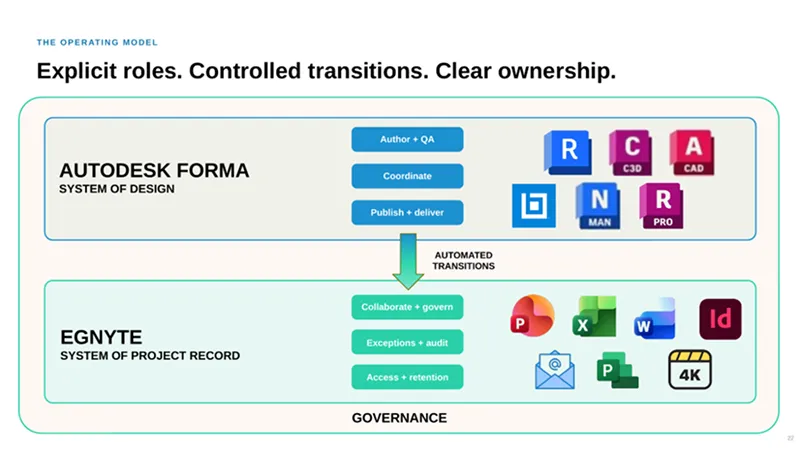
When the team analyzed its data, it found that most project records are not design data at all. Non-design information accounted for 76% of files by count and 72% by size on their projects. That shaped their answer. The team scored options on user experience, AEC workflow fit, governance and long-term vendor confidence, not on feature counts. And rather than forcing everything into one solution, Brown and Caldwell adopted two platforms to serve distinct, complementary roles. Autodesk Forma is their ‘system of design’, where models and drawings reside for active authoring, Revit worksharing, clash detection, and issue management. Meanwhile, Egnyte is the ‘system of project record’, where reports, specifications, correspondence, contracts, and final deliverables are curated and maintained.
Automation links the two. When a milestone or record set is issued, Revit models are copied from Forma into Egnyte to complete the project file package. Decker referred to this process as “intentional replication.” As the session description states, files from DGN and DWG to XLSX stay in sync between the platforms.
Brown and Caldwell’s operating model: Autodesk Forma as the system of design, Egnyte as the system of project record, linked by automated transitions. Source: Egnyte and Brown and Caldwell, AU 2026
The team shared lessons learned—mostly about data governance, which Rybacki defined as ‘a system of decision rights and rules.’ He emphasized that firms need to be clear about who owns the rules, avoid uncontrolled copies, don’t build fragile automations that need babysitting, and close out every project so that the record is final. An unexpected benefit of this process with Egnyte has been cleaner, better-governed data, which Rybacki stated puts the firm in a better position to adopt AI.
Step 2: Turn files into context
An organized file structure is a good first step, but AI doesn’t understand the significance of a PDF. Egnyte’s two AU theatre talks addressed this issue directly, stating: “Files are not data. Metadata is not context.”
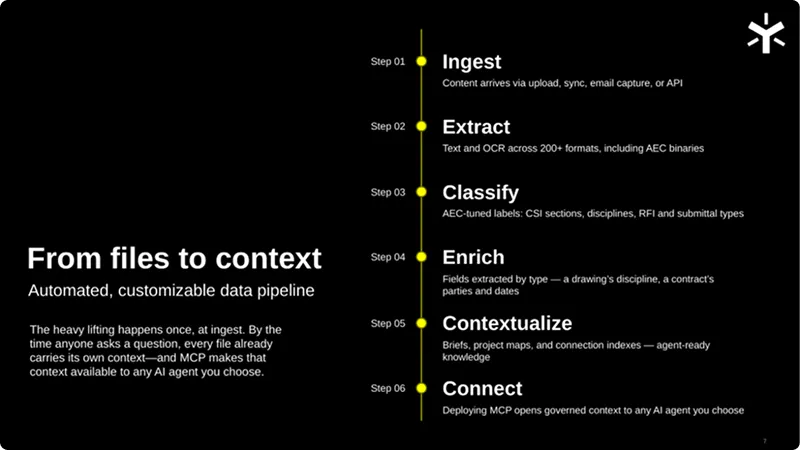
Egnyte’s solution is an automated AI content pipeline. Files are collected into one governed place, AEC files are classified (e.g., drawings, photos, RFIs, contracts, etc.), and relevant metadata is added to each file through an AI-powered enrichment process. This enriched content is then made available to Egnyte’s AI Assistant and externally through integrations with dozens of AEC tools, hundreds of business apps, and 500+ built-in AI connectors (MCP servers curated by Egnyte). One demo showed an RFI email filed from Outlook into the right project folder, with its key details extracted as metadata. Another showcased an AI assistant answering a query across Autodesk Forma, Microsoft Teams and Egnyte, and drafting a new email update to share out the result.
Egnyte’s six-step pipeline turns raw project files into context that AI agents can use. Source: Egnyte, AU 2026
This pipeline feeds the Egnyte Context Layer. The premise is simple: AI doesn’t inherently understand how a business or project works. A construction manager knows that a submittal is tied to a project, specification section, revision and review stage, but a LLM must piece those relationships together every time. The Context Layer maps these relationships across content, people, projects, permissions, business systems, activity and industry knowledge, then assembles the relevant knowledge graph for the job at hand. An agent reviewing a contract is provided with a different context than one preparing a proposal.
Egnyte benchmarked the impact of Context Layer on AI performance using an 1,800-document sample project. The model, agent, documents, and questions were held constant, and answers were verified against human-labeled results. When compared with a traditional hybrid retrieval approach using an agentic RAG loop, the use of Context Layer produced impressive results: 94% improvement in answer accuracy, 77% faster response times, and 97% fewer tokens consumed per query. Egnyte cautions that these results will vary by workload, model and data. The direction, though, matches Gartner’s prediction that by 2027, organizations that prioritize semantics in AI-ready data can increase agentic AI accuracy by up to 80% and reduce costs by up to 60%.
Several new features have been introduced for AEC firms. We’ve already touched on auto-classification and metadata extraction for AEC documents (i.e., the content enrichment process). AI actions surface relevant next steps directly within Project Center. AEC agents in Egnyte’s Agent Marketplace give firms ready-to-use starting points for specific jobs. And the Autodesk Forma Data Management AI Connector makes Autodesk content accessible in Egnyte while extending Egnyte context back into Forma, enabling AI to work across both systems.
The next layer is Context Studio, unveiled on October 15. Egnyte CEO Vineet Jain put it this way: “AI without context is just expensive guessing.” Context Studio builds on the Context Layer and shows the people, projects, content and connected systems an AI agent can reach, and flags gaps. In the live demo, a project manager ran a daily construction report agent. Context Studio mapped the agent’s sources, including Procore and Autodesk Forma, flagged that certain data was missing for onsite equipment, and offered a fix that sets up an extraction for it. Egnyte is presently rolling out Context Studio in its agent builder UI, with further updates planned through the first half of next year.
Step 3: Control what AI can reach
More connected agents also mean more paths to sensitive files. The Context Layer works within existing permissions: access is resolved before information reaches the model, so no one gains access through AI to files they couldn’t otherwise see. The second announcement at State of Egnyte on October 15, AI Control Center, extends that control. It gives IT teams one dashboard to see every AI agent connected to company content and the sensitive data each one can reach. Egnyte says admins can narrow an over-permissioned agent’s access, review agents before they go live and produce audit-ready reports. In Egnyte’s live demo, each agent carried a risk score. Restricting folder access and requiring approval for actions brought one agent from high risk to low. Because AI Control Center runs where the content already lives, nothing has to be copied to a separate system to be governed. Egnyte also said sensitive-content masking is coming later this quarter. This feature will enable AI to use a file, such as a contract, while hiding values like ID numbers. This improves AI accuracy without over-exposing a firm’s data.
fied when OpenAsset collaborated with Solidquality to chart its buyers for its brand research. "We're now selling to entire buyer committees," Ries states. "I hear more and more from customers whose entire leadership team has overruled an order their buyers made."
What this means for your firm
The order matters. Brown and Caldwell didn’t start with AI. They started by deciding where design data and project records belong, and they adopted technology to support that workflow. For other firms running platforms like Autodesk Forma and Egnyte, the practical first step is the same: give every type of information an accountable home. Only then ask AI to work across it.
The Egnyte Context Layer, Context Studio and AI Control Center enable firms like Brown and Caldwell to build upon that well-governed digital foundation, leveraging fast, highly accurate, and cost-efficient AI workflows.
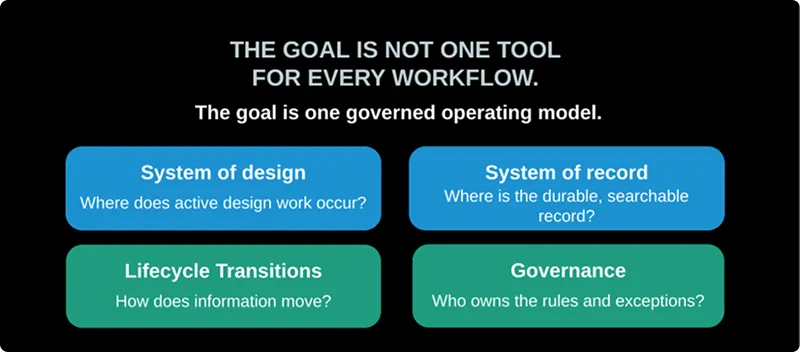
The goal is not one tool for every workflow, but one governed operating model. Source: Egnyte, AU 2026 Continue the conversation
Aaron Vorwerk, AEC Practice Leader at Egnyte, joins our December aec+tech Talk. Register here, and bring your questions.
Recent Articles
Learn about the latest architecture software, engineering automation tools, & construction technologies