LEED v5 is here: How One Click LCA helps you stay ahead with Life-cycle Assessments for Certification
Forty percent.
That’s the total share of global carbon emissions stemming from the construction and operation of the built environment, according to the OECD, the UNEP, and multiple other international institutions concerned with the future of global development. While the efforts of state- and national-level initiatives toward urban decarbonization vary across regions, certain frameworks have long emerged to provide a uniform foundation for well concerting your endeavours to achieve set targets with definitive intents.
Green-building rating systems, with LEED standing at the forefront, have strongly contributed to industry and market transformations to create a milieu for environmentally-preferable building materials and products, in global markets. True, over the many years of LEED’s activities in North America and beyond, the industry has organized itself to support a growing number of projects to evaluate and make decisions about material performances informedly, purchase responsibly, and consequently, build less-environmentally-impactful buildings.
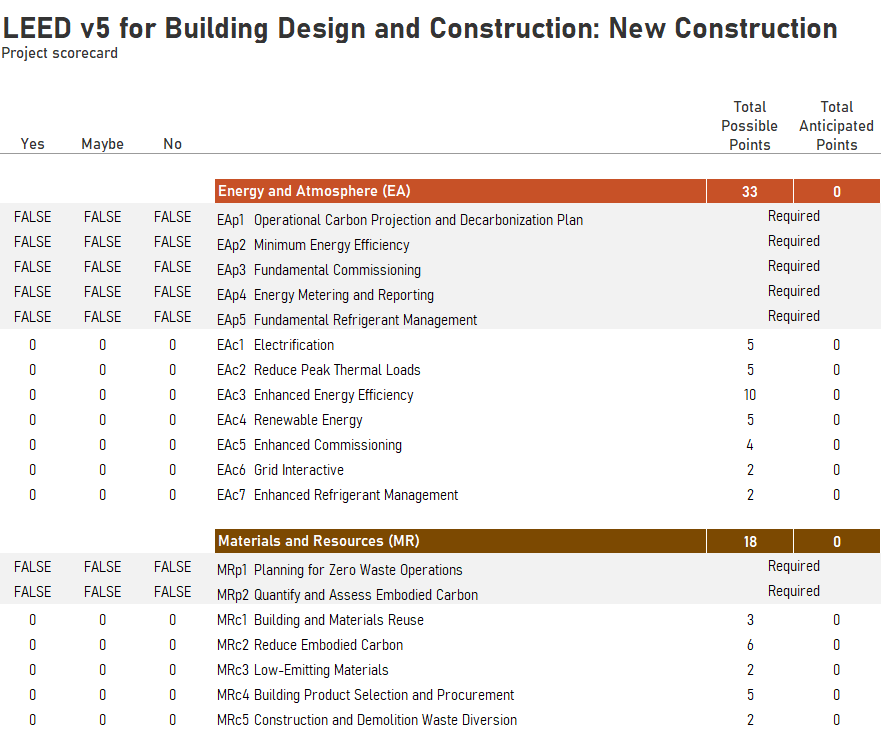
With the release of the newest version of the rating system, LEED v5, there is an even greater impetus to take responsible material/product choices to the next level.
One Click LCA, the industry-standard software product for building life-cycle assessments, steps in here to streamline material and product choices, and calculate embodied carbon + other environmental impacts, in a way that is truly compatible with LEED v5. What would otherwise take projects longer to compute and document have all been revamped and simplified with One Click LCA’s newest LEED v5 Tool, that effectively lets you achieve the latest LEED prereqs./credits with just a few clicks.
Read on to find out more!
What does LEED v5 expect, with Embodied Carbon?
LEED’s credit category Materials and Resources has long pushed for responsible material sourcing, promoted building and material reuse, and advocated for reduced C&D waste. While the intent has remained staunch over the years, LEED v5 explicitly brings the focus on Embodied Carbon to the foreground.MRp2 - Quantify and Assess Embodied Carbon
Compared to v4.1, the latest version demands ALL projects to perform a life-cycle assessment to be even eligible for the certification, thanks to the new MRp2 prerequisite. Projects registering for certification now need to carry out an embodied carbon assessment of at least their structure, enclosure, and hardscape materials. This shall include all relevant construction elements such as concrete, steel, masonry, insulation, aluminum, wood, cladding, glass, and asphalt, as well as any ancillary structures like parking areas within the LEED boundary.
For the prerequisite, it is deemed sufficient if projects calculate cradle-to-gate (A1 - A3) emissions by multiplying each material’s GWP per unit by its quantity. Use of life-cycle assessment or embodied carbon software (like One Click LCA) is acceptable for reporting A1 - A3 results.
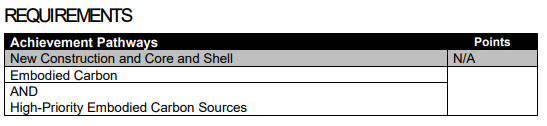
MRc2 - Reduce Embodied Carbon
While the prerequisite only demands teams to measure and obtain a high-level awareness about the embodied carbon impacts of their projects, the credit MRc2 - Reduce Embodied Carbon is where the crux of LEED v5's material performance intent lives. What was once just an optionality in a larger credit for material performance, has now been enshrined as a very significant contributor to impact mitigation, with about 6 possible points achievable at best.
The intent is to reduce the project’s embodied carbon (cradle-to-grave, Modules A-C), which needs to be documented through one of few possible methods. They are as follows.
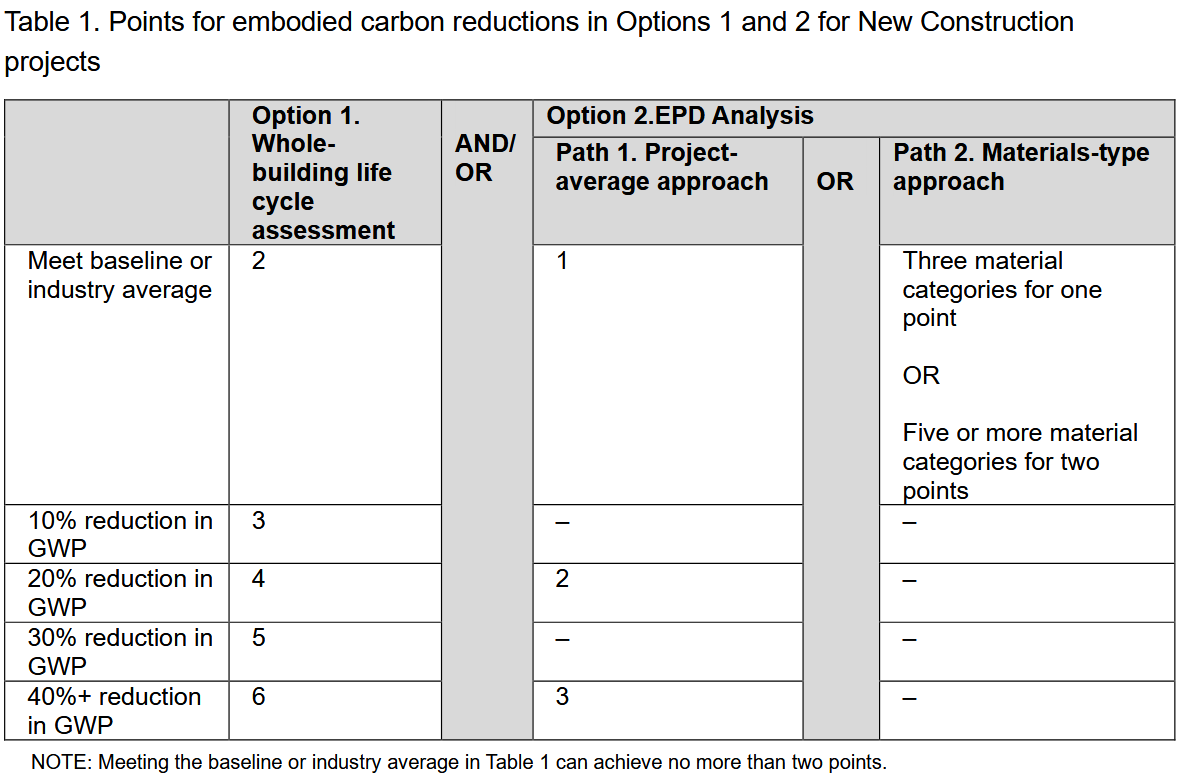
Whole-building Life-cycle Assessment: By conducting a building LCA, teams identify material swaps for lower-carbon alternatives. Each 10% reduction in embodied carbon earns one point, provided all impact categories are reported in the documentation.
EPD Analysis: Alternatively, teams can use verified Environmental Product Declarations (EPDs) to show carbon improvements against industry benchmarks. This pathway offers up to 3 points for the weighted average Global Warning Potential of all major materials, or up to 2 points for a few select categories.
BONUS - Tracking Carbon Emissions from Construction Activities: LEED also paves a way to recognize projects that actively monitor and quantify the carbon emissions associated with on-site construction activities, in this same credit. This is done by documenting all the fuel and utility usages of the contractor’s jobsite operations.
In total, the credit provides multiple lines through which projects could demonstrate an active reduction in the embodied carbon impacts of their projects.What does this mean for practitioners?
Mainstreaming LCAs and embodied carbon calculations for all projects from the start is a positive shift. Teams experienced with MR documentation already understand the requirements for measuring material impact improvements, particularly when utilizing tools like One Click LCA.
Teams new to life-cycle assessments may find LEED v5's mandatory documentation requirements surprising. However, the industry has rapidly evolved, providing software solutions to help projects manage these new assessments effectively.
One Click LCA’s LEED v5 Tool with its latest features steps in, right at this juncture, to enable and streamline all projects to perform an LCA to comply with the rating system and secure points, and while doing so, go the next mile in reducing the project’s environmental impacts!
One Click LCA’s LEED v5 Tool: An LCA for every project
Building on its previous capabilities of embodied carbon computations across elements in different material categories, the LEED v5 Tool of One Click LCA extends support to specifically ease the process to document LEED v5 credits, for your project. The new features of the v5 tool specifically augment its capabilities to model the modules A5, B1 to B5, and C1 to C4, all of which are now required for the LCA calculations.
Data Inputs:
When computing embodied carbon impacts, up until the previous version, the only data required for the result was that of building materials (to quantify A1-A3 modules’ impacts). But with LEED v5’s enhanced requirements, it is no longer sufficient. One Click LCA’s v5 tool provides you with parameters to input all the required data, so the final reports are compliant with the credits of LEED v5.
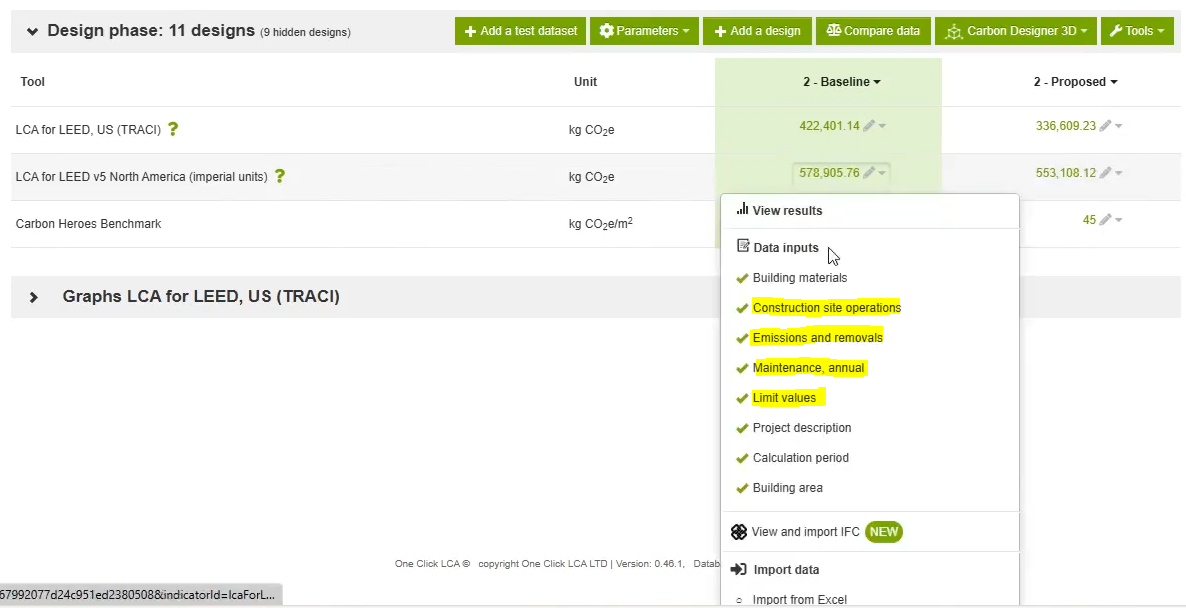
Four data inputs enable projects to document all life-cycle modules (A-C) required for the new credit, and support the EPD-based pathway for securing points:
-
Construction site operations
-
Emissions and removals from refrigerant leakage and concrete carbonisation
-
Maintenance-related emissions
-
Limit values for EPD-method comparison
While these new inputs seem minor, they can make or break if projects actually do achieve the embodied carbon prerequisite and credit, in LEED v5.
Building Materials - Wastage Calculation:
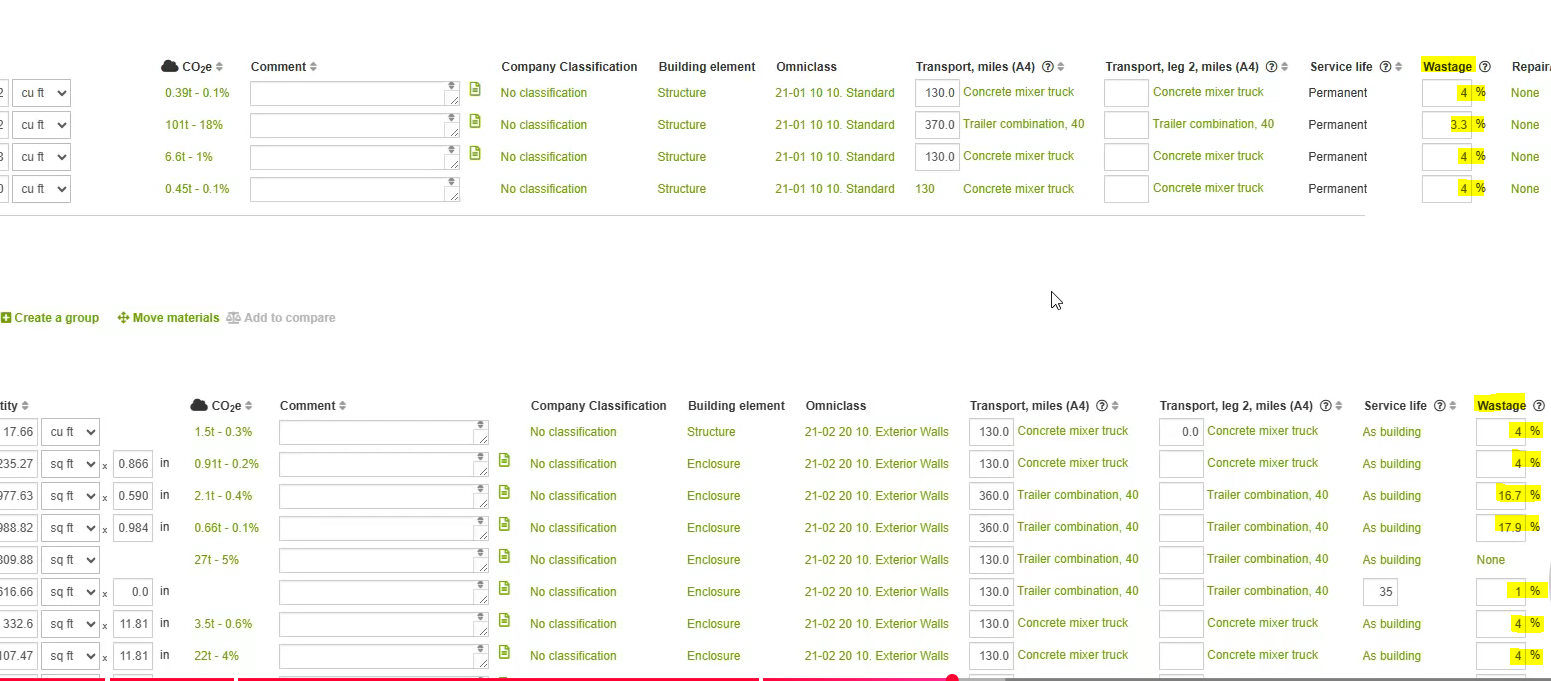
Figure 5) Fields for Material Wastage Calculation on the LEED v5 Tool
For an accurate calculation of module A5: construction-phase emissions in LEED v5, the wastage of building materials in each category also needs to be accounted for. One Click LCA’s v5 tool eases this process by helping you specify a wastage rate for each material input. With it, the precise quantity that is actually used to construct on site could be determined and documented.
The tool succinctly includes the A5 module calculation on top of the existing workflow, without making any workarounds.
Construction Site Operations:
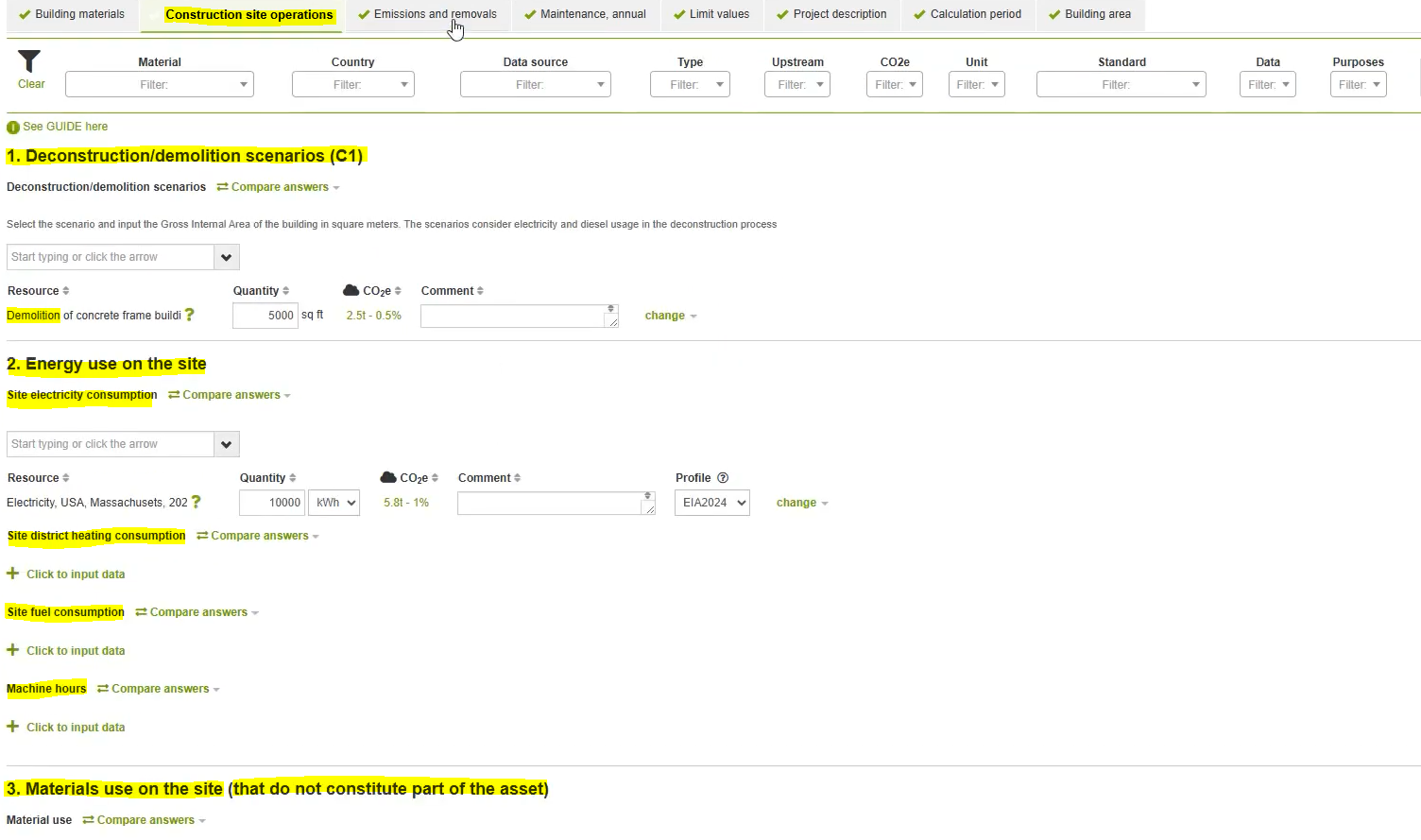
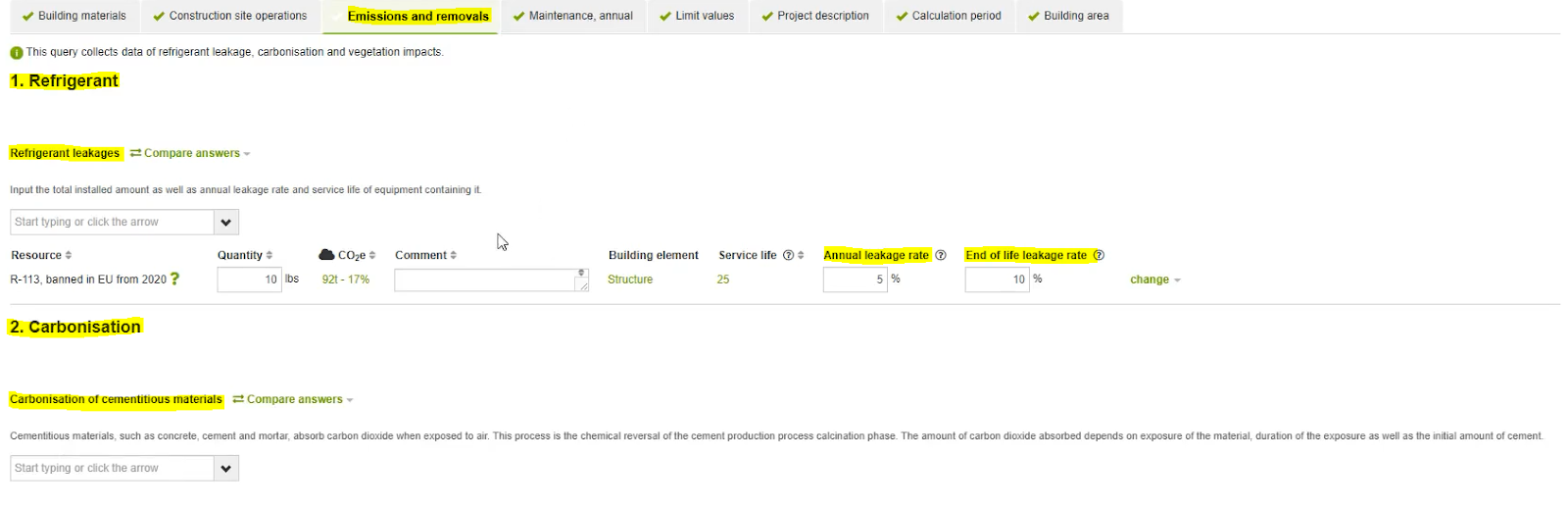
Figure 7) Quantification of Refrigerant Leakage and Carbonisation on the LEED v5 Tool
Maintenance Emissions:
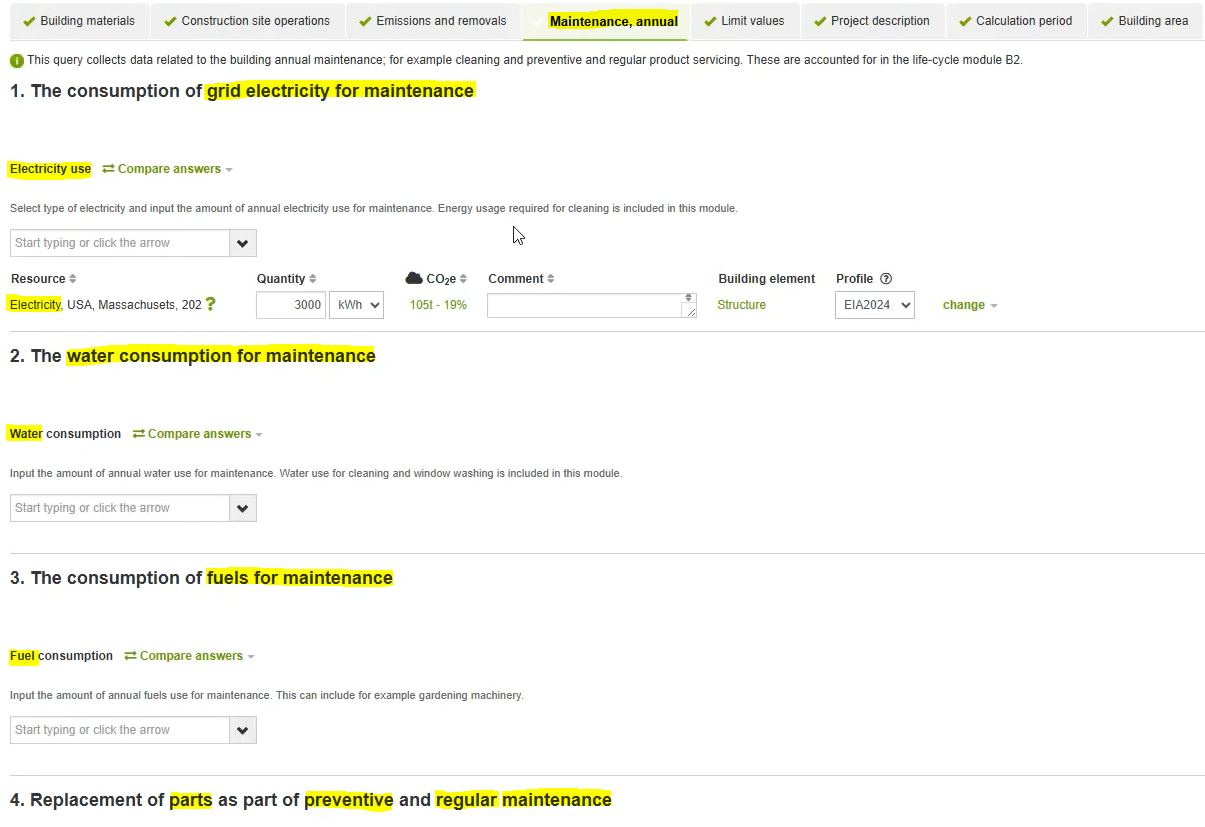
Figure 8) Accounting for Maintenance-related Emissions/Consumption on the LEED v5 Tool
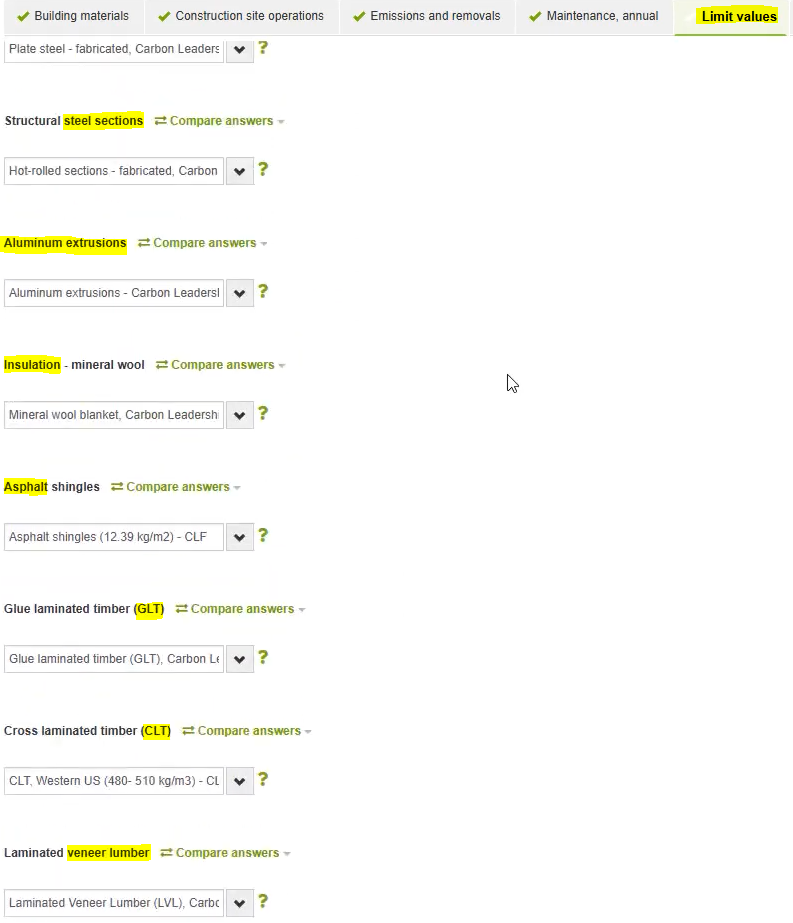
Figure 9) Industry-average Limit Values for Materials on the LEED v5 Tool
With LEED v5 offering more than one pathway to document embodied carbon reductions, inputs are provided to identify industry-average limit values for each material used in the project. These default baseline values are already integrated into the One Click LCA database, obtained from sources like the CLF (Carbon Leadership Forum) datasets.
Thereafter, material data from EPDs provide a way to secure points without necessarily performing an LCA, under this pathway.
Results Representation - LCA:
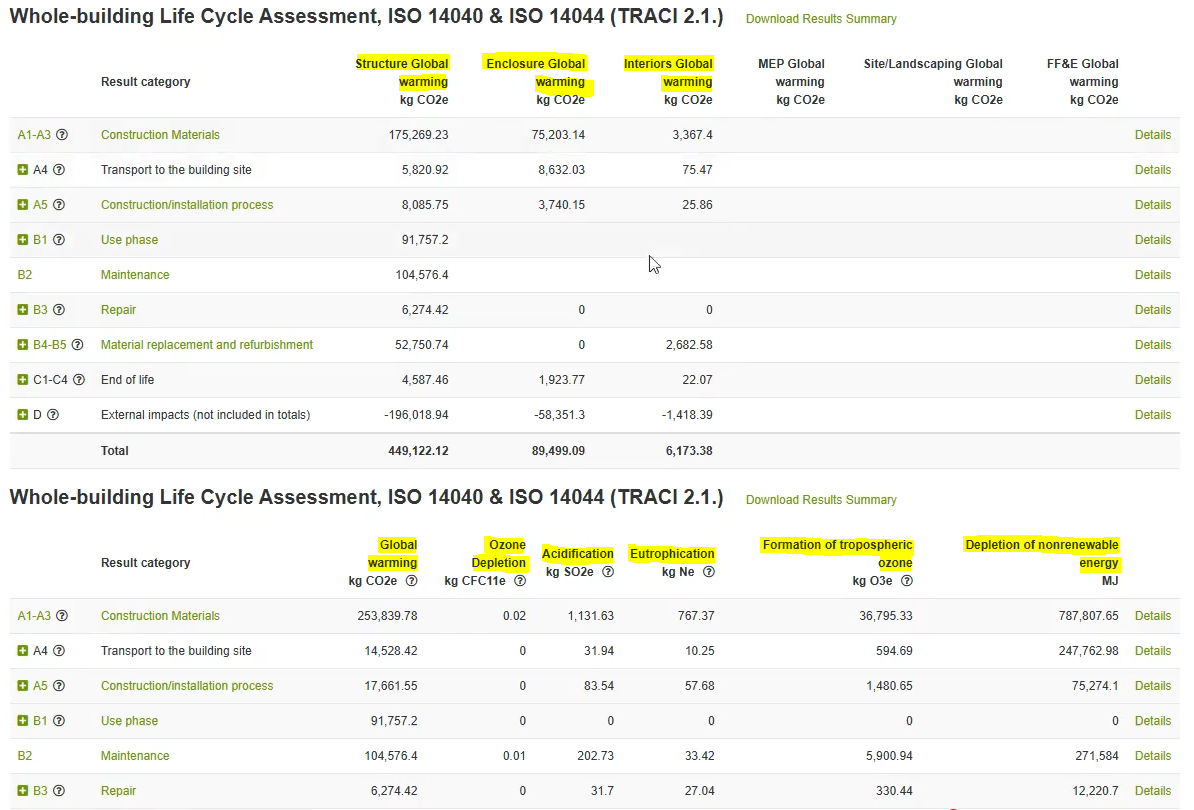
Figure 10) Two ways of Results Reporting on the LEED v5 Tool
As the credit demands, the v5 tool enables users to output results, not only in terms of just global warming potentials categorized by source, but also across all possible impact categories evaluated.
Results Representation - EPD Analysis:
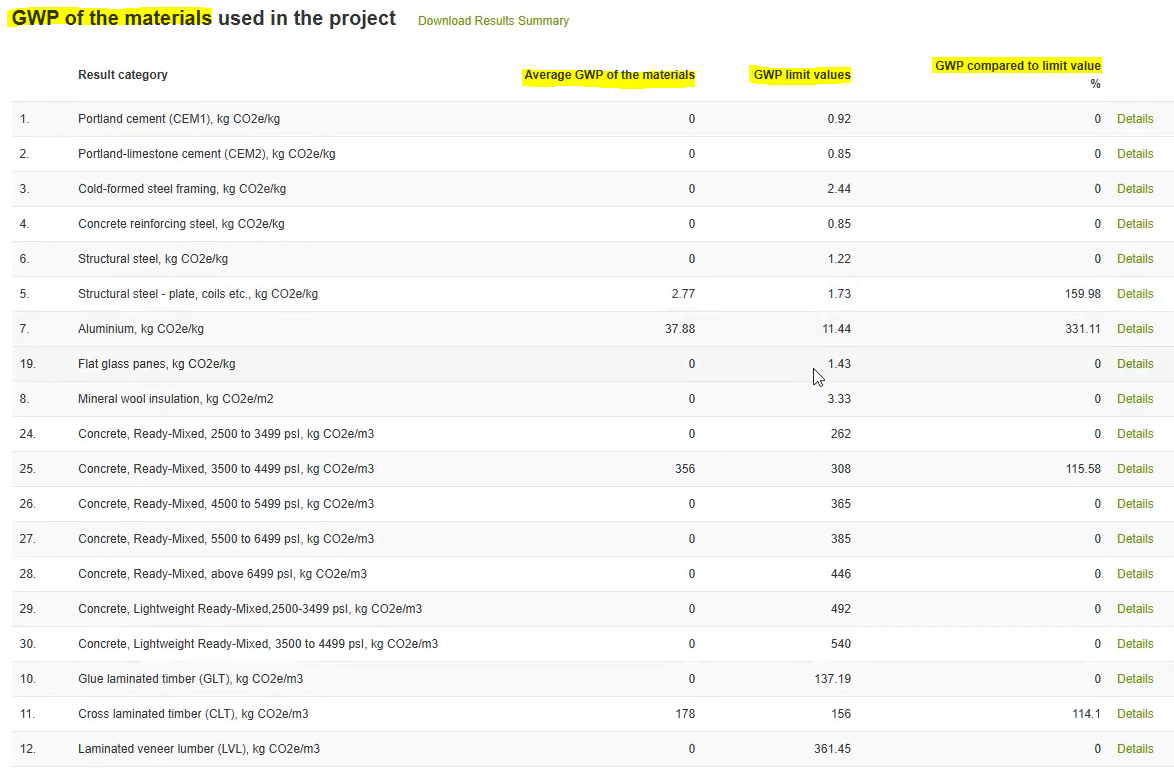
To document results through the EPD Analysis pathway, the v5 tool identifies the impact reduction achieved from the EPDs used, against the industry averages obtained from the CLF datasets.
Results Representation - Most Contributing Materials:
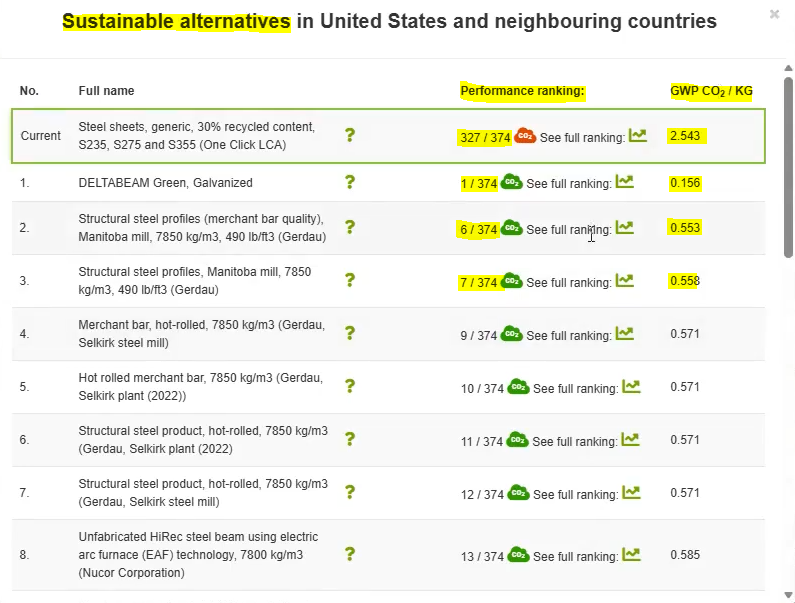
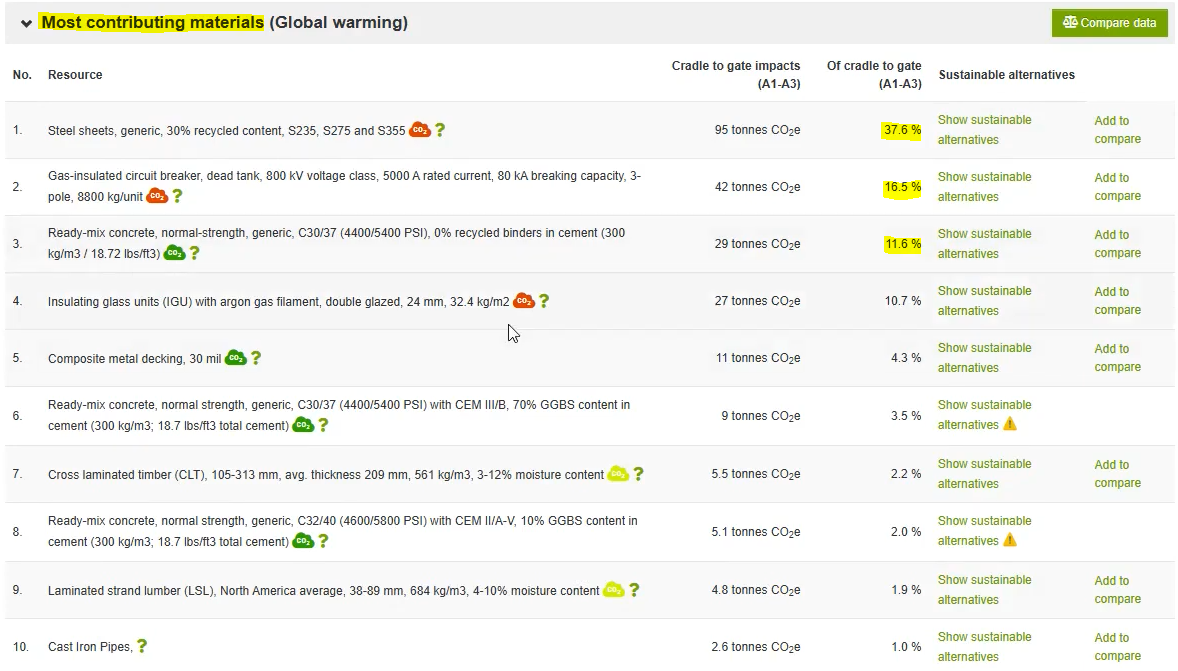
As the new prerequisite demands, the tool lets you spot the carbon hotspots in your design (up to 25 most carbon-intensive elements per project), and as well suggests more environmentally-preferable alternatives to address the same.
Results Representation - LEED v5-compliant Reporting:
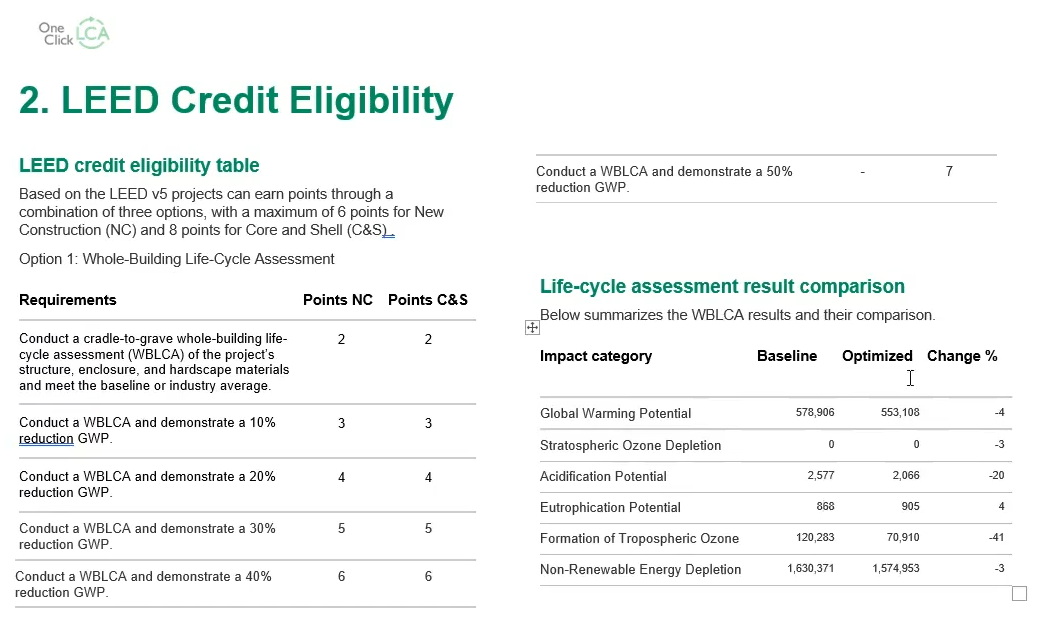
Figure 14) Automatic Report Generation from the LEED v5 Tool
And finally, putting together all the aforesaid requirements from the new prerequisite and credit, the One Click LCA v5 tool documents the relevant information and KPIs automatically as a full-fledged credit report, that could easily be used as part of the project submittals.
So, what now?
For nearly a decade, One Click LCA has been the premier global solution for life cycle assessments across diverse project scales. Its specialized tools and extensions allow teams to meet various international rating systems, setting it apart from localized alternatives.
LEED v5 is driving a major industry shift by mandating LCAs for all projects seeking certification. One Click LCA’s LEED v5 Tool is specifically designed to meet these new, rigorous requirements, providing the essential support project teams need to navigate this transition.
The future of sustainable building remains promising; regardless of the political climate, the AEC Tech space is entering an era of significant innovation and transformation.

Editor’s Note
This article is an independent review written by Niknaz Aftahi, Founder of aec+tech, based on publicly available information, product documentation, and industry knowledge of life-cycle assessment workflows. While One Click LCA is featured as a leading solution in this space, this piece reflects an external perspective on how the platform aligns with LEED v5 requirements and broader industry trends in embodied carbon analysis.
Recent Articles
Learn about the latest architecture software, engineering automation tools, & construction technologies
What Architecture Firms Actually Need from IT (and Why It’s Been Missing)
Most AEC firms have worked with generalist IT providers—and the results are rarely ideal. Flying Buttress founder Michael Donahue set out to change that, building an MSP tailored to architecture and engineering firms, with deep expertise in Autodesk environments, project-based workflows, and the unique culture of design practices.
Why BIM Validation Is No Longer Optional in AEC Project Delivery
An unvalidated BIM model isn't just a quality risk anymore—it's a budget risk, a legal liability, and a schedule threat. This article examines how Solibri's rule-based model checking is becoming essential across data center construction, transportation infrastructure, and design-build delivery, where the cost of getting the model wrong keeps rising.
Automating MEP Clash Resolution in AEC: Meet Vavetek AI and BAMROC
Vavetek AI's BAMROC tackles one of AEC's most persistent bottlenecks: not finding clashes but resolving them. While tools like Revizto and Solibri handle detection well, the fix still falls on BIM coordinators working manually through conflicts one by one. BAMROC plugs into existing Revit and Navisworks workflows and uses rule-based AI to automatically resolve MEP and structural clashes at scale—cutting work that might take a full day down to under an hour.
Fixing the Real Bottleneck in BIM with Solibri CheckPoint
Solibri CheckPoint is about fixing what slows BIM teams down after clashes are found. Instead of the heavy desktop setup, it runs model checks in a web browser while cloud computers handle the 3D work. More people can review models, assign issues, and track changes. This helps teams move from “problem found” to “problem fixed” faster, with less waiting and rework. In this article, we explain everything you need to know about Solibri CheckPoint.